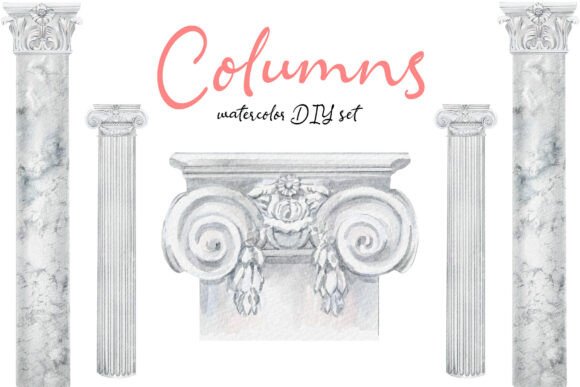
DIY Columns - Hand-drawn Watercolor Set: Bringing Classical Elegance to Modern Design
In the world of digital design, there is a constant tug-of-war between sleek minimalism and rich, textured detail. Often, projects feel too sterile or overly generic because they rely on rigid vector shapes and stock photography that lacks soul. This is where resources like the DIY Columns - Hand-drawn Watercolor Set become indispensable. This collection isn't just a pack of clipart; it is an elegant assembly of architectural illustrations inspired by classical design and timeless structural beauty. Each column is carefully hand-drawn and softly rendered in watercolor, combining refined sketch details with gentle washes of neutral, stone-like tones. For designers, entrepreneurs, and creative hobbyists, this set offers a bridge between historical grandeur and contemporary artistic expression.
The Unique Aesthetic of Hand-Drawn Architecture
What sets this resource apart is its specific approach to texture and tone. Unlike standard vector graphics that can look flat or artificial, these columns feature a blend of minimal linework and subtle watercolor texture. The artist has focused on creating a sophisticated balance, using soft, neutral washes that mimic the look of weathered stone or marble without the heaviness of a photorealistic image. This "soft" quality allows the elements to integrate seamlessly into various layouts without overpowering other design components.
The variety within the DIY Columns – Hand-Drawn Watercolor Set ensures you aren't limited to a single style. You will find different column orders and decorative architectural elements that can be easily combined to build unique compositions. Whether you need a simple Doric pillar for a border or an ornate Corinthian capital for a header, the versatility of the collection supports complex layering. Because these are high-resolution PNG files with transparent backgrounds, they act as building blocks rather than fixed images, giving you the freedom to arrange them exactly how your vision requires.
Real-World Applications for Wedding and Event Designers
One of the most immediate and impactful uses for this set is in the wedding and event industry. Couples today often seek themes that feel romantic yet grounded in history. A wedding invitation suite featuring a delicate watercolor column instantly communicates elegance and timelessness. Imagine a save-the-date card where the date is framed by two soft, sketched pillars, suggesting a venue that feels like a historic estate or a grand garden pavilion.
Event planners can also utilize these assets for digital invites, seating charts, and program booklets. The neutral, stone-like tones of the watercolor washes pair beautifully with gold foil accents, calligraphy fonts, and muted floral arrangements. Because the lines are hand-drawn, they add a human touch that feels personal and bespoke, distinguishing the event from those using mass-produced templates. For a bride planning her own stationery, this set removes the need for expensive custom illustration while still delivering a premium, high-end look.
Enhancing Branding and Editorial Layouts
Beyond weddings, the DIY Columns - Hand-drawn Watercolor Set serves as a powerful tool for branding, particularly for businesses in the lifestyle, luxury, and education sectors. Consider a boutique architecture firm, a high-end interior design studio, or a publisher of classic literature. These brands benefit from imagery that suggests stability, heritage, and refinement. Using these columns as background elements on a website's "About Us" page or as dividers in a blog post can subtly reinforce the brand's identity without being loud or distracting.
For editorial designers working on magazines or e-books, these assets solve the problem of visual monotony. Instead of relying solely on photos, a layout designer can use a column fragment to frame a pull quote or separate sections of text. The transparency of the PNG files makes this incredibly easy; you can drop a column into Adobe InDesign, Photoshop, or even Canva, resize it, and let it fade into the background. The result is a publication that feels curated and thoughtfully designed, elevating the perceived value of the content within.
Practical Benefits for Small Business Owners and Marketers
Small business owners and freelancers often operate with tight budgets and limited time. Hiring a professional illustrator for every project is rarely feasible, yet maintaining a consistent, high-quality visual identity is crucial. This is where the practicality of the DIY Columns – Hand-Drawn Watercolor Set shines. It acts as a cost-effective solution that delivers professional results. You can use these elements across packaging designs, social media graphics, email newsletters, and product labels.
Imagine a skincare brand that wants to convey purity and natural ingredients. A label featuring a faint, watercolor architectural motif can suggest structure and reliability, contrasting nicely with organic product names. Or consider a marketing agency creating a presentation deck for a client in the real estate sector. Incorporating these classical elements can make slides feel more authoritative and polished. The ability to mix and match different styles means you can create a cohesive library of assets that work together across all your marketing channels, ensuring your brand looks consistent whether it's on a business card or a billboard.
Educational and Creative Hobbyist Uses
The utility of this set extends beyond commercial applications into education and personal creativity. Educators teaching art history, architecture, or design can use these images to illustrate concepts without needing access to physical ruins or museums. They can be printed for classroom posters, used in interactive slide decks, or included in student worksheets to help visualize different architectural orders.
For hobbyists and scrapbookers, the DIY Columns - Hand-drawn Watercolor Set opens up new possibilities for mixed-media projects. Since the files are compatible with Procreate and other digital art tools, users can trace over them, color them differently, or combine them with their own sketches to create entirely new artwork. Digital collagers can layer these columns over photographs of modern cities to create a surreal juxtaposition of old and new, sparking conversation and interest on social media platforms like Pinterest or Instagram.
Technical Versatility and Workflow Integration
A critical factor when choosing digital assets is how easily they fit into your existing workflow. This set is delivered as high-resolution PNG files with transparent backgrounds, which is the gold standard for flexibility. This format ensures that the elements are fully versatile and easy to use in Canva, Photoshop, Procreate, and other design tools for both digital and print applications. There is no need to wrestle with complex layers or opaque backgrounds that require tedious editing.
Whether you are designing on a tablet with a stylus or working on a desktop computer, the high resolution ensures that the details remain crisp when scaled up for large prints or sharpened down for mobile screens. The neutral color palette also means you can adjust the hue or saturation to match your specific project needs without losing the integrity of the watercolor texture. This adaptability saves hours of editing time, allowing creators to focus on composition and storytelling rather than technical hurdles.
Considerations Before You Start
While the DIY Columns – Hand-Drawn Watercolor Set is incredibly versatile, it is important to consider your specific project needs before downloading. First, evaluate the mood you want to convey. If your project requires a bold, industrial, or ultra-modern aesthetic, these soft, classical elements might clash unless used intentionally for contrast. They work best in contexts where elegance, history, and softness are desired.
Additionally, consider the complexity of your layout. While the set includes various elements, successful integration often relies on restraint. Overloading a design with too many architectural details can make it look cluttered. It is often more effective to use one or two prominent columns as focal points and let the rest of the design breathe. Finally, ensure you have the appropriate software to handle PNG files if you plan on advanced manipulation, though basic tools like Canva are sufficient for most users. By understanding these nuances, you can maximize the impact of these beautiful illustrations and bring a touch of classical grandeur to your next creative endeavor.